
Help/Your account/Deleting your Trax account
Deleting your Trax account
You can permanently delete your Rounded Trax account, and everything in it, from inside the app. This can't be undone.
Before you delete
Deleting your account removes your trip history for good. The ATO expects you to keep the records supporting a vehicle claim for five years after you lodge the return they relate to, so export anything you may still need first.
Export your logbook first
In Trax, go to Trips and tap the export icon to email yourself a CSV or PDF of your trips. Keep that file somewhere safe — we can't recover it for you after the account is deleted.
Cancel your subscription separately
If you have a paid Trax subscription, deleting your account does not cancel it. Subscriptions are billed by Apple or Google, so you need to cancel through the store you bought it from:
- iPhone: Settings → your name → Subscriptions → Rounded Trax → Cancel Subscription.
- Android: Play Store → profile icon → Payments & subscriptions → Subscriptions → Rounded Trax → Cancel.
Cancel before you delete, otherwise you may keep being charged. Any time already paid for isn't refunded when you delete your account.
Delete your account in the app
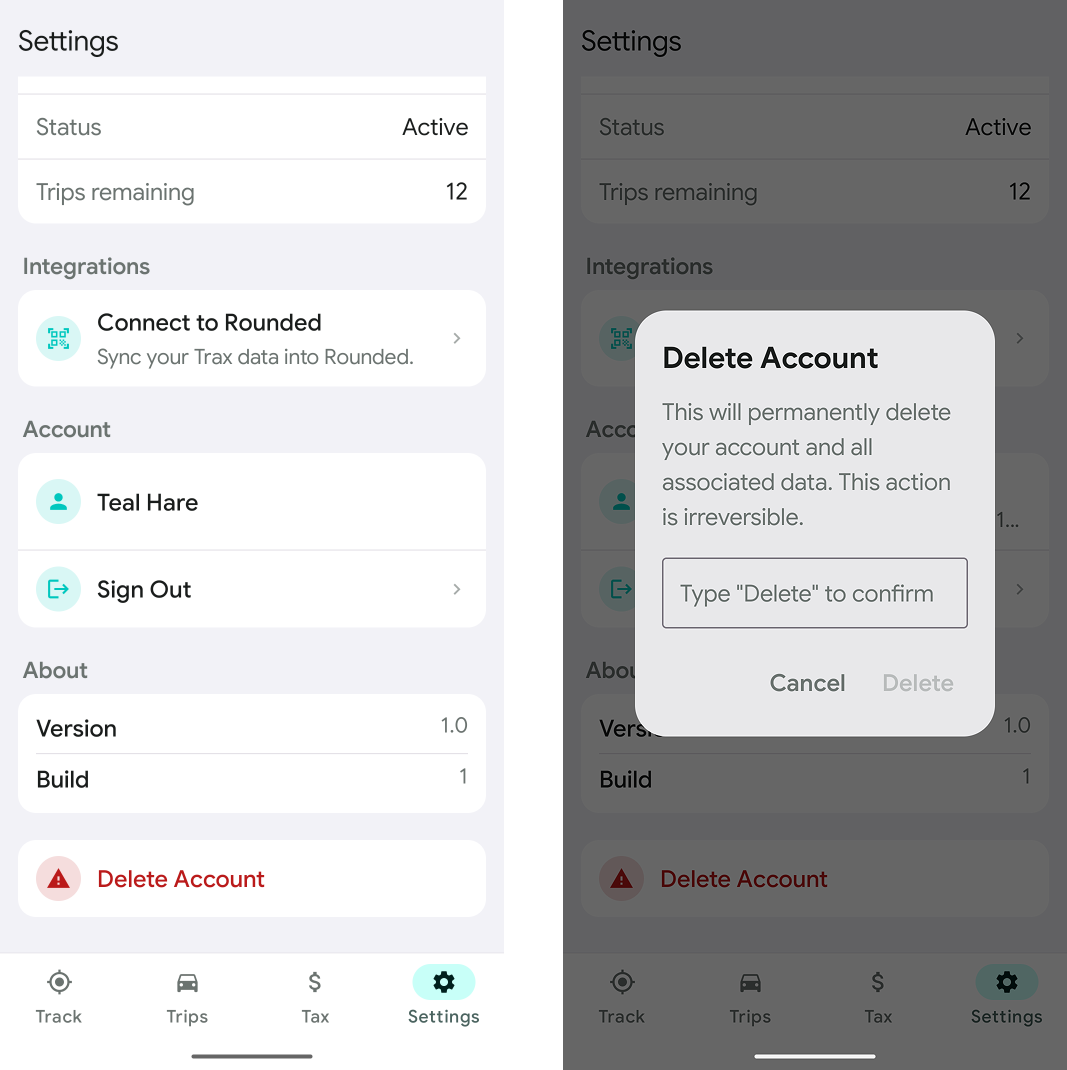
The steps are the same on iPhone and Android. Delete Account is its own row at the very bottom of the Settings screen, scroll all the way down past About to find it.
- Open Trax and tap Settings in the bottom tab bar.
- Scroll to the bottom of the screen and tap Delete Account.
- A confirmation dialog appears. Type Delete into the field to enable the delete button — it stays greyed out until you do.
- Tap Delete to confirm. Tap Cancel if you've changed your mind.
You'll be signed out straight away and the app will return to the sign-in screen.
What gets deleted
Deleting your account permanently removes:
- your recorded trips, distances and routes;
- your vehicles, trip categories and tags;
- your logbook periods and any exports we've generated for you;
- your profile, email address and app settings.
Your data is deleted from our systems within 30 days. We keep only what the law requires us to keep — billing and tax records, for example. See the Privacy Policy for the detail.
Trax and Rounded are separate accounts
Deleting your Trax account doesn't affect your Rounded accounting account, or the other way around. You'll need to delete each one separately.
Ask us to delete it for you
If you'd rather we handled it — or you've lost access to your phone or can't sign in — send a request through the support form and we'll take care of it.
Use the email address the account is registered to so we can confirm the request is genuinely yours, and tell us you'd like your Trax account deleted. We'll email you to confirm once it's done.
Last updated: July 2026
Still need help?
Send the support team a message and we'll get back to you by email.
Contact support